Free software

HasStoppedWorking for Windows

HasStoppedWorking lets you disable the Windows notification window that reports that an application has stopped working.
Compatibility and required permissions

  • Operating system: Windows 7 or later, as confirmed by the owner of Todo sobre informática.
  • Permissions: the tool must be run as an administrator.

Requirements updated on .

Compatibility with this tool does not mean an older Windows version is still supported. Windows 7 support has ended; keep this in mind when choosing the system on which to use it.

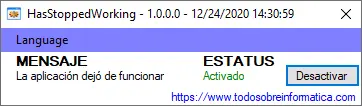
HasStoppedWorking with its original Spanish-language controls

Button labels

  • Press Desactivar (Disable) to disable the notification window.
  • Press Activar (Enable) to enable it again.

The described function concerns the notification window; it does not claim to repair the application that stopped working. This translation retains the original program and its Spanish controls. Compatibility with your Windows version has not been newly tested for this page.

How to use HasStoppedWorking step by step

  1. Download the tool using one of the links on this page. If you choose the ZIP file, extract it before opening the program.
  2. Right-click HasStoppedWorking.exe and choose Run as administrator. If Windows requests approval, grant it only if you are authorised to administer that computer.
  3. Choose Desactivar (Disable) to hide the notification window reporting that an application has stopped working.
  4. To show that notification again, reopen HasStoppedWorking with administrator rights and press Activar (Enable).

What it changes — and what it does not

The documented function controls the notification window. Hiding the message does not repair the application that crashed, identify the cause of the failure or recover unsaved work.

For example, if a program closes repeatedly, disabling its notification is not evidence that it has stopped crashing. First record the application's name and the message it displays so that you retain useful information for investigating the problem.

If you need help

If you cannot apply the change, check that you opened the tool as an administrator. On a computer belonging to an organisation or someone else, ask its administrator for permission; do not disable Windows protections to force it to run.

You can contact us with your Windows version, the button you used and the message that appeared. Do not send passwords or other private information.

Download HasStoppedWorking

Editorial responsibility: Todo sobre informática.

Comments (0)

Comments are shown in their original language.

No comments have been published yet. Be the first to join the conversation.

Add a public comment

Your email is optional and will not be published. Comments are reviewed before they appear.

We will only use it to let you know if we reply.