This is an English explanation of the site's original six-step RollerCoin signup guide. Its screenshot and instructions describe an older form, not a newly tested registration. The source describes a free account and an English-language interface; check the current form and eligibility requirements before proceeding.
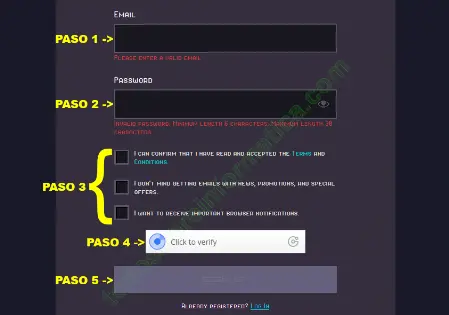
1. Email
The field labelled EMAIL asks for your email address. Use an address you control. Do not post it together with login details in public comments.
2. Password
The old guide states a minimum of six characters. That is a historical form rule, not a security recommendation or confirmation of today's minimum. Use a long, unique password and follow the requirements displayed by the current form.
3. Read the three checkboxes separately
The source says to click all three. Their wording describes different choices, so this translation does not repeat that blanket instruction:
- “I CAN CONFIRM THAT I HAVE READ AND ACCEPTED THE TERMS AND CONDITIONS.” This concerns acceptance of the terms; read them before agreeing.
- “I DON’T MIND GETTING EMAILS WITH NEWS, PROMOTIONS, AND SPECIAL OFFERS.” This concerns promotional email, not verification of your email ownership.
- “I WANT TO RECEIVE IMPORTANT BROWSER NOTIFICATIONS.” This concerns browser notifications, a separate preference from accepting the terms.
Choose communication preferences deliberately. The screenshot does not establish which boxes are mandatory on the current form. RollerCoin's terms and account rules are a separate document to review; this guide does not accept them for you.
4. Human verification
The original button reads “Click to verify”. Complete the displayed verification yourself if you choose to register. This guide does not provide a way to bypass it.
5. Submit the form
The older button is labelled “SIGN UP”. Review the entered information and choices before submitting a real registration.
6. Verify the email address
The source describes an English email containing “VERIFY YOUR EMAIL”. Its purpose is to confirm control of the address. Be cautious with unexpected messages and check the destination of any link; a familiar sender name alone does not authenticate an email.
The original concludes that all six steps are necessary. Treat them as its historical workflow, not proof that the current signup process is identical. No new account or email verification was performed for this translation.
Comments (1)
Comments are shown in their original language.
yeny · 31-07-2022 00:00 · Venezuela
no entendi nada
Reply from Todo sobre informática · 31-07-2022 00:00
Hola Yeny, ¿qué fue lo que no entendiste, la creación de la cuenta o en que consiste?. Saludos